What should a bio solve?
Most people who open your profile came from a post, a story or a search, and they don't know you. The bio has to answer three questions for them: what is this account about, is it for me, and what should I do next? If those answers are missing, even the nicest emoji row won't help.
So pick one goal before writing. Do you want a follow, a message, an order or a booking? The last line should serve that goal. A bio that asks for everything usually gets none of it.
The four-question formula
A good bio answers four questions in order. Each takes one line, often just a few words.
| Question | What to write | Example |
|---|---|---|
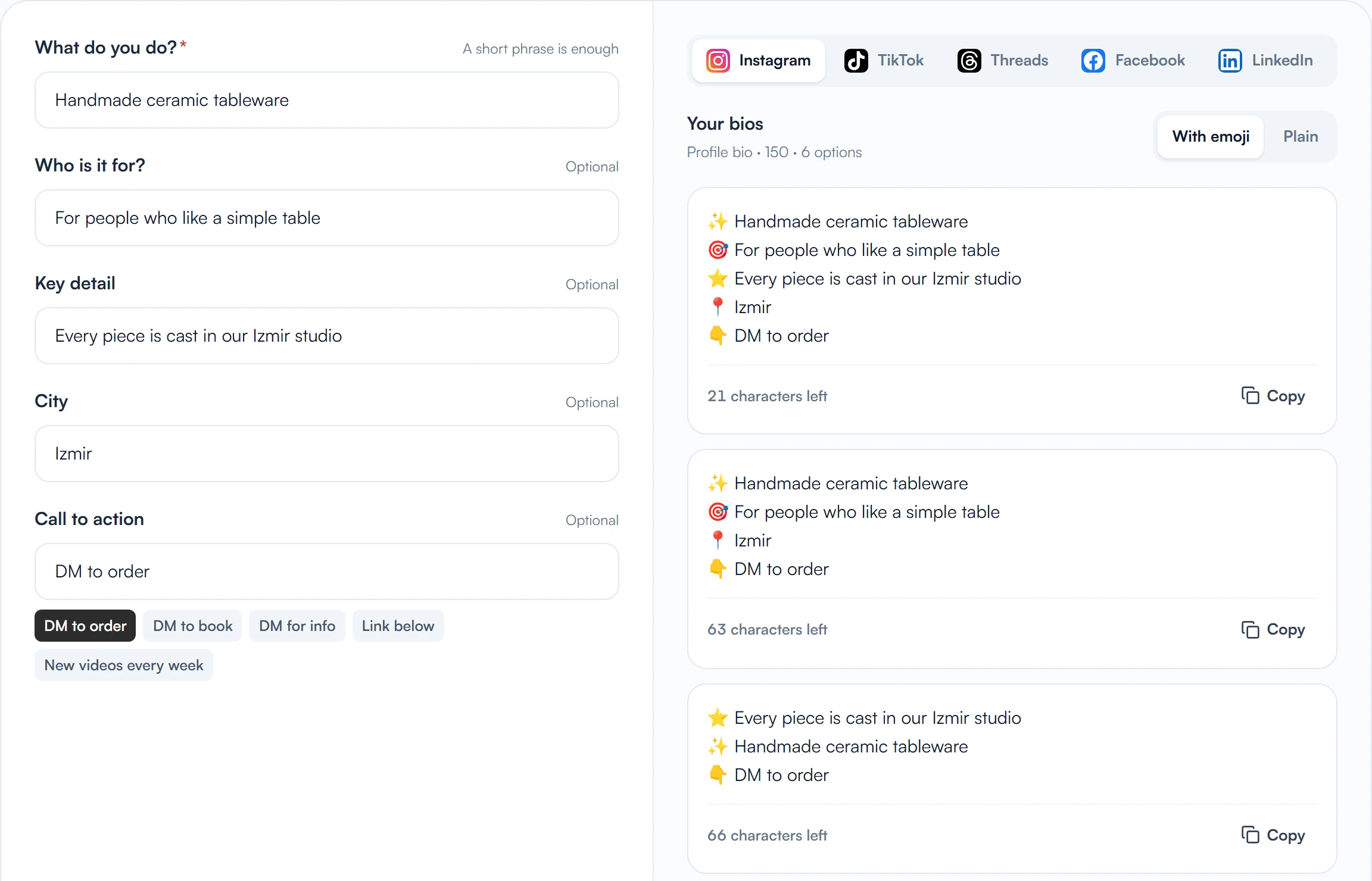
| 1. What do you do? | Your trade or product, plain and concrete | Handmade ceramic tableware |
| 2. Who is it for? | Your audience or use case | For people who like a simple table |
| 3. Why you? | One proof point: a year, a number, a method, a title | Every piece is cast in our Izmir studio |
| 4. What now? | One action | DM to order |
There is also a list of things to avoid: lines every account could carry (“Live life, love it”), rows made only of emoji and empty pointers like “link below”. They use up characters and tell the visitor nothing.
The name field is part of the bio
Instagram matches both your username and your name field in search. Your username is usually your brand name and should stay put; the name field is flexible. If you put what you do next to your brand there (“Defne Ceramics | Studio”), people can find you without already knowing your brand.
Don't stuff it with keywords, though. “Ceramic plates cups gift Izmir” looks unreadable and untrustworthy. Brand name plus one short description is enough.
Examples by type of account
The accounts below are made up; they show how the formula looks in different kinds of work. Line breaks are real line breaks in the bio.
Local business: a café
Example: “Roasts its own beans in Kadıköy. Open daily 8 am–10 pm. DM to book a table.” Who, where, when and what to do are readable at a glance. Opening hours answer the most common message (“are you open?”) before it arrives.
Service provider: a freelancer
Example: “Logo and brand identity for small businesses. 120+ brands, 6 years. Email for a free discovery call.” The proof sits right after the line saying who you serve. Only write a number that is actually true; an inflated number breaks trust the moment someone asks about it.
Creator
Example: “15-minute recipes for people who don't like cooking. 3 videos a week. Weekly list in the link below.” The promise, the posting rhythm and what the link is are all clear. A visitor knows what they get by following.
Agency or team account
Example: “Social media agency. We run content calendars for e-commerce and café brands. Link for a quote.” On an agency account, naming the sectors you work in is safer than naming clients, and needs no client's permission.
Before and after: three typical fixes
| Problem | Before | After |
|---|---|---|
| What you do is unclear | Live with passion ✨ Dream 🌿 Be yourself | Plant care guide 🌿 20 plants that stay alive indoors. Weekly guide below |
| More than one goal | Follow, DM, visit the site, join the newsletter, see the shop | DM to order 📩 (Site and newsletter in the link field) |
| No proof | Quality and reliable service | 300+ boiler services since 2018, Istanbul Asian side |
The accounts in the table are made up too. The fixes share one move: replace an abstract adjective with something checkable. Instead of “quality”, say how long you have been doing what you do.
Use the character limit wisely
- An Instagram bio holds up to 150 characters, TikTok's limit is 80. Don't paste the same text into both; shorten it for TikTok.
- Line breaks take space too. Before splitting a line, ask if you can shorten it instead.
- Emoji look short but fill the space quickly. Use them as markers at the start of a line, not decoration: 📍 location, 📩 contact, 👇 link.
- Your username and name field show in search results before the bio does. Don't move anything a stranger needs to the name field; put it in the bio.
If you want a starting draft, the Bio Generator lays out what you do, who it is for and your call to action in several layouts side by side and shows how much of each platform's limit each one uses. The text stays in your browser and you don't need an account. You'll still want to edit the result into your own words.
Make the link and the action match
The last line of the bio names an action, and the link has to take people there. If the two don't match, visitors get lost: writing “tap the link for the menu” and sending them to your home page, for example.
- Add the link in the Links field of Edit profile, not into the bio text; that's the clickable one.
- If you need more than one destination, give each a clear name: “Menu”, “Booking”, “Newsletter”.
- If the link keeps changing (campaign, new product), update the link field instead of rewriting the bio each time, and use a stable phrase such as “Current offer in the link”.
- If you want to know which link brings visits, add a tracking tag to the address. How to do it is covered in our UTM parameters guide.
Keep the bio current
A bio should not be written once and forgotten. Update it when your hours change, when you add a service, when a campaign ends. A bio still announcing an old campaign makes the profile look abandoned.
Every three months, ask yourself: would a stranger reading this understand what I sell? If you are not sure, show the bio to a friend and ask what they understood after five seconds. If it doesn't match what you meant to say, change the text.
Checklist before you publish
- Does the first line say plainly what you do?
- Is it clear who it is for?
- Is there one proof point you can back up?
- Does it name one action, and does that action match the link?
- Does the name field carry your brand name and a short description?
- Are typos, an old campaign and a broken link all gone?
- Did you avoid publishing a phone number or email you'd rather keep private? On a professional account the contact button does that for you.
Frequently asked questions
How many characters can an Instagram bio have?
Up to 150. Spaces, line breaks and emoji count toward the number. A TikTok bio is limited to 80 characters.
Should I put keywords in my bio?
Write the words that truly describe what you do; don't string keywords together for their own sake. Putting a short description next to your brand name in the name field helps people who don't know your username find you.
Should I use emoji in my bio?
You can, but make them useful: small markers for location, contact or link make reading easier. Filling every line with emoji uses up characters and makes the text hard to read.
Is the link in my bio clickable?
Add the link in the Links field of Edit profile. Don't count on an address typed into the bio text being clickable.
How often should I change my bio?
When the information changes: hours, services, a campaign or a link. If nothing has changed, reading it every three months for anything outdated or vague is enough.